Sport Balls: Integrating High-Resolution Vector Assets into Creative and Commercial Workflows
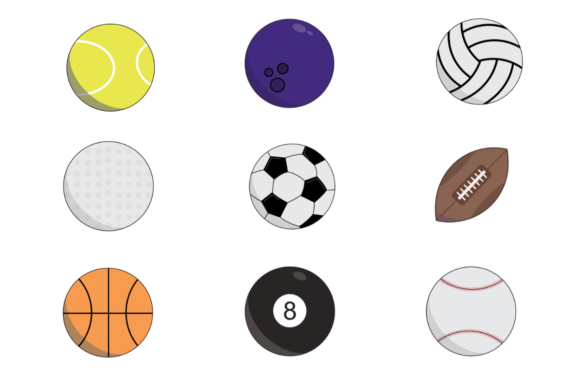
In the landscape of digital design and physical crafting, asset quality dictates the ceiling of your final output. Whether you are a freelance graphic designer building a sports marketing campaign or a hobbyist creating custom team memorabilia, the technical specifications of your source material determine your efficiency and professional credibility. The Sport Balls collection addresses this need by providing nine distinct vector illustrations optimized for both high-fidelity print production and scalable digital application. Understanding how to leverage these specific assets—delivered as 3600 x 3600 px files at 300 DPI across multiple formats—is essential for streamlining your creative process from initial concept to final delivery.
Technical Specifications and Workflow Compatibility
Before integrating any asset library into a production pipeline, it is necessary to verify that the technical parameters align with your output requirements. This collection is engineered for versatility, removing common friction points associated with low-resolution or single-format graphics. Each of the nine sport ball illustrations measures 3600 x 3600 pixels, translating to a 12 x 12 inch print area at 300 DPI. This resolution is the industry standard for professional printing, ensuring that edges remain crisp and colors stay vibrant whether applied to a business card or a large-format poster.
The inclusion of multiple file formats within the ZIP folder serves distinct functional purposes in different stages of a project:
- EPS and SVG: These vector-based formats are critical for the design phase. They allow for infinite scaling without pixelation, making them ideal for logo integration, merchandise design, and layout adjustments where size fluctuates frequently. Designers using Adobe Illustrator, Affinity Designer, or CorelDRAW should default to these formats to maintain editability.
- PNG: With transparent backgrounds, these raster files are optimized for quick placement in composite designs, web graphics, and digital presentations. They eliminate the need for manual masking, saving significant time during the assembly phase of digital projects.
- JPG: Best suited for proofing, client mockups, or platforms that do not support transparency. These serve as lightweight references during the approval process before committing to high-resolution rendering.
- PDF: Useful for direct printing or sharing with stakeholders who lack design software but need to verify visual accuracy and color fidelity.
By organizing these assets based on their technical strengths, you prevent workflow bottlenecks caused by format incompatibility or resolution errors late in the production cycle.
Pre-Production Planning and Asset Management
Efficient creative execution begins before the first element is placed on the canvas. For professionals managing multiple clients or educators preparing curriculum materials, organization is as important as artistry. Upon receiving the ZIP folder, immediate extraction and systematic renaming are recommended best practices. Rather than keeping generic filenames, integrate the Sport Balls assets into your existing digital asset management (DAM) system or project folder structure.
Consider creating a dedicated subfolder labeled "Sports_Vectors_300DPI" within your master resource library. Tagging these files with metadata such as "vector," "transparent," "3600px," and specific sport names enhances searchability for future projects. This preparation phase ensures that when a deadline approaches, time is spent on creative problem-solving rather than hunting for the correct file version. For small business owners and marketers, this level of organization supports brand consistency across various campaigns, ensuring that the same high-quality ball illustration used on a website header matches the one printed on promotional flyers.
Applications in Digital Design and Marketing
In the digital realm, the no-background feature of the PNG and SVG files significantly accelerates the compositing process. Marketers and content creators often need to produce social media graphics, blog headers, or email newsletter visuals under tight turnaround times. The 3600 x 3600 px dimensions provide ample headroom for cropping and resizing for various aspect ratios—from square Instagram posts to wide LinkedIn banners—without degrading image quality.
For web designers and UI/UX professionals, the SVG format offers particular advantages. Because vectors are code-based, they render sharply on all screen densities, including Retina displays and 4K monitors. Integrating these sport balls into a sports betting platform, an e-commerce store for athletic gear, or a coaching portfolio ensures visual clarity regardless of the user's device. Furthermore, SVGs can be styled with CSS, allowing for dynamic color changes or hover effects that static raster images cannot achieve. This flexibility transforms a static illustration into an interactive design element, enhancing user engagement without requiring additional asset creation.
Execution in Physical Crafting and Print Production
The transition from digital file to physical object requires strict adherence to resolution standards. The 300 DPI specification of this collection is specifically calibrated for this purpose. Crafters, scrapbookers, and DIY enthusiasts utilizing inkjet printers, Cricut machines, or professional print-on-demand services will find these assets reliable for tangible products.
When designing for physical media, consider the following implementation strategies:
- Print-and-Cut Projects: Use the high-resolution PNG for sticker sheets, vinyl decals, or iron-on transfers. The clean edges facilitated by the no-background design reduce weeding time and material waste.
- Scrapbooking and Card Making: The 12 x 12 inch scale aligns perfectly with standard scrapbook paper sizes. You can use the full illustration as a focal point or scale it down for accent elements. Because the files are vectors (EPS/SVG), you can also separate individual components if your cutting software supports layer manipulation, creating custom embellishments from a single source file.
- Merchandise Manufacturing: For entrepreneurs producing t-shirts, mugs, or tote bags, the EPS files provide the necessary data for screen printing and sublimation. The vector paths ensure that curves remain smooth even when scaled to cover an entire garment back.
Quality control in physical production also involves color management. While the digital files are precise, printer calibration varies. Always perform a test print on your intended substrate before running a full batch. The PDF proofs included in the package serve as a baseline reference to identify any color shifts introduced by your specific hardware or paper stock.
Educational and Instructional Use Cases
Beyond commercial and recreational applications, these illustrations serve as valuable tools for educators, coaches, and trainers. Visual aids enhance learning retention and engagement. The clear, isolated imagery of the Sport Balls collection is ideal for creating worksheets, flashcards, presentation slides, and instructional posters. Teachers can incorporate these vectors into lesson plans regarding physics, geometry, or physical education without worrying about copyright ambiguity or pixelated clip art that undermines professionalism.
For coaches developing playbooks or training manuals, the ability to overlay text, arrows, and tactical markers onto a clean ball illustration facilitates clearer communication. The vector format allows these diagrams to be resized for pocket-sized handouts or gymnasium wall charts while maintaining legibility. This utility extends to online course creators and bloggers who need consistent, high-quality visuals to break up text-heavy content and illustrate specific concepts related to athletics or equipment.
Optimizing Long-Term Value and Efficiency
Acquiring a specialized asset pack like Sport Balls is an investment in long-term workflow efficiency. To maximize return on this investment, treat the collection as a modular component of your broader creative ecosystem. Avoid using the assets only for their literal representation; explore abstract applications. A cropped section of a basketball’s texture might serve as a background pattern, while the silhouette of a soccer ball could function as a unique bullet point or icon in a corporate presentation.
Consistency is another factor in long-term value. By establishing this set as your go-to resource for sports imagery, you create a cohesive visual language across disparate projects. Clients and audiences begin to associate that specific style and quality level with your brand or personal work. This reduces decision fatigue during the sourcing phase of new projects, as you already possess a verified, high-quality solution for sports-related visuals.
Finally, maintain backup copies of the original ZIP folder in cloud storage or an external drive. Project files can become corrupted, and software updates may alter compatibility. Having access to the pristine source files ensures that you can always regenerate derivatives or adapt to new technological standards without repurchasing or recreating assets. This disciplined approach to asset management transforms a simple download into a sustainable pillar of your creative infrastructure, supporting everything from spontaneous DIY weekend projects to large-scale commercial deliverables with equal reliability.