Evaluating Hand Draw Watercolor Illustrations for Digital and Print Projects
In the landscape of digital design, the distinction between authentic artistic media and simulated effects often dictates the emotional resonance of a final project. Hand Draw Watercolor illustrations occupy a specific niche that bridges traditional artistry with modern vector utility. Unlike purely digital paintings or algorithmic filters, these assets retain the organic imperfections of physical pigment on paper while offering the scalability required for contemporary web and application development. When evaluating resources for branding, social media, or product packaging, understanding the technical and aesthetic implications of this hybrid format is essential for making an informed selection.
Distinguishing Authentic Media from Digital Simulation
The primary value proposition of a Hand Draw Watercolor illustration lies in its origin. Many stock libraries offer "watercolor style" graphics created entirely within software like Procreate or Photoshop using custom brushes. While these digital alternatives are efficient, they often lack the chaotic fluid dynamics of real water interacting with paper grain. Authentic hand-painted assets capture unpredictable blooms, hard edges from drying pools, and subtle color gradients that are difficult to replicate programmatically.
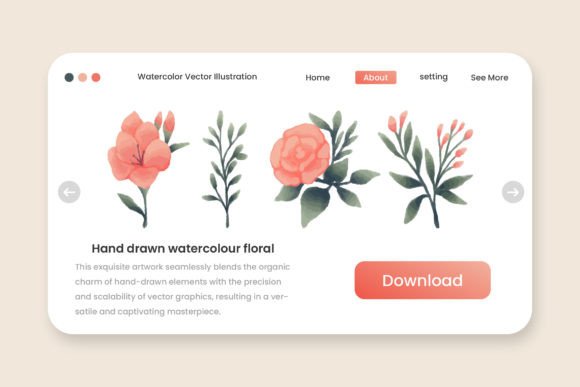
For designers comparing options, the decision often comes down to the desired level of polish versus authenticity. Digital simulations tend to be cleaner and more uniform, which suits corporate tech interfaces or minimalist UI elements. Conversely, genuine Hand Draw Watercolor Floral illustrations introduce a tactile warmth that signals craftsmanship and human touch. This makes them particularly effective for industries relying on emotional connection, such as wedding stationery, organic skincare branding, boutique e-commerce, and lifestyle editorial content. The tradeoff is that real watercolor can appear messier at small sizes, requiring careful consideration of where and how the asset will be deployed.
Technical Versatility: Vector vs. Raster Considerations
A critical factor in selecting illustration assets is file format flexibility. Traditional watercolor is inherently raster-based; once paint dries on paper, it is a fixed pixel arrangement. However, professional-grade Hand Draw Watercolor resources now frequently include both raster and vector derivatives to maximize utility across different mediums. Understanding the specific role of each included file type prevents workflow bottlenecks.
- PNG Files: These are typically high-resolution raster images with transparent backgrounds. They are best suited for web use, social media overlays, and digital mockups where preserving the exact texture of the original painting is paramount. Because they maintain the original scan data, they show every brushstroke detail but cannot be scaled up indefinitely without quality loss.
- SVG Files: Scalable Vector Graphics versions of watercolor are usually traced interpretations of the original art. While they allow for infinite scaling without pixelation, users should be aware that vectorization can sometimes simplify complex color bleeds. SVGs are ideal for responsive web design, app icons, and cut files for crafting machines, but they may lack the microscopic texture fidelity of the PNG counterpart.
- AI and EPS Files: These source files serve as the master editable documents. For a collection featuring 13 Hand Draw Watercolor Floral illustrations, having access to AI and EPS formats allows designers to isolate individual botanical elements, adjust composition, or modify color palettes directly within Adobe Illustrator. This editability transforms a static image into a flexible design system.
Comparing Botanical Collections Against Generalist Assets
When researching illustration packs, buyers often choose between large, generic bundles and smaller, curated thematic sets. A focused collection, such as one containing 13 distinct floral compositions, offers different advantages compared to massive libraries of disparate elements. Thematic consistency is the most significant benefit. In a dedicated Hand Draw Watercolor Floral set, the artist likely used the same paper stock, pigment brand, and lighting conditions for scanning. This ensures that when multiple illustrations are used together on a website header or packaging suite, they share a cohesive color temperature and textural weight.
Generalist packs, while offering higher volume, often suffer from visual dissonance. Mixing watercolors from different artists or scanning sessions can result in clashing styles where one flower looks vibrant and saturated while another appears washed out or digitally processed. For professionals building a unified brand identity, a smaller, consistent set of 13 Hand Draw Watercolor Floral illustrations often provides better ROI than a larger, inconsistent library. The limitation, naturally, is variety; if a project requires diverse flora not included in the specific set, supplementary assets may be needed. Evaluators must weigh the importance of visual harmony against the need for broad categorical coverage.
Editability and Color Customization Tradeoffs
The ability to customize colors is frequently cited as a key feature in premium illustration packs, but the reality of editing hand-painted art differs from editing pure vector graphics. When a product description highlights "Editable Text Colors" or adjustable hues in AI/EPS files, it is important to understand the mechanism. In true watercolor vectors, color changes are often achieved through recolor artwork tools or opacity masks rather than simple fill swaps.
This approach preserves the luminosity and layering effects characteristic of watercolor, but it requires a moderate proficiency in vector software. Users accustomed to flat design may find the learning curve steeper. However, for those willing to engage with the file structure, the payoff is significant. Being able to shift a floral palette from spring pastels to autumn earth tones while retaining the hand-drawn integrity extends the lifespan of the asset. In contrast, standard PNG-only watercolor packs force designers to rely on hue/saturation adjustments in raster editors, which can degrade image quality and produce artificial-looking color shifts. The inclusion of editable source files is therefore a decisive factor for long-term projects requiring seasonal or brand-specific adaptations.
Practical Application and Usage Scenarios
Determining whether Hand Draw Watercolor is the correct solution requires mapping the asset’s strengths to specific project requirements. Based on comparative analysis of current design trends and technical constraints, these illustrations perform optimally in specific contexts while presenting challenges in others.
Ideal Use Cases:
- Packaging and Label Design: The organic nature of hand-painted florals complements physical products, especially in food, beverage, and cosmetics. The texture suggests natural ingredients and artisanal production methods.
- Event Stationery: Wedding invitations, save-the-dates, and menus benefit from the romantic, timeless quality of real watercolor. The 13-illustration format provides enough variation for a complete stationery suite without repetitive motifs.
- Social Media Branding: For Instagram stories, Pinterest pins, or blog headers, these assets add visual interest without overwhelming text. The transparency of PNG files allows for easy layering over colored backgrounds or photography.
- Textile and Surface Pattern Design: With editable AI/EPS files, individual floral elements can be extracted and rearranged to create seamless patterns for fabric, wallpaper, or wrapping paper.
Situations Requiring Alternatives:
Despite their versatility, Hand Draw Watercolor illustrations are not universally applicable. For high-contrast accessibility requirements, such as safety signage or dense data visualization, the low contrast and soft edges of watercolor can hinder legibility. Similarly, in hyper-modern or cyberpunk aesthetic contexts, the traditional association of watercolor may create cognitive dissonance. Technical limitations also exist; because these assets originate from physical scans, file sizes for high-res PNGs can be substantial, potentially impacting page load speeds if not optimized. In performance-critical web environments, developers may need to convert these assets to WebP or AVIF formats, whereas pure CSS or simple SVG shapes would be more efficient.
Making the Final Selection Decision
When comparing Hand Draw Watercolor resources, look beyond the preview images. Previews demonstrate artistic style but rarely reveal technical robustness. A prudent evaluation checklist should verify the inclusion of multiple formats (AI, EPS, PNG, SVG) to ensure cross-platform compatibility. Confirm that the "hand draw" claim is backed by visible paper texture and natural pigment variation rather than digital brush artifacts. Assess whether the quantity—in this case, 13 distinct floral illustrations—aligns with the scope of your current and future projects.
Ultimately, the choice between hand-drawn watercolor and other illustration styles is a strategic decision about brand voice and technical workflow. For audiences aged 20–50 who value authenticity and are navigating an increasingly synthetic digital environment, genuine hand-painted assets offer a tangible point of differentiation. By carefully weighing the tradeoffs between organic beauty and digital precision, and by verifying the technical specifications of editable source files, designers and marketers can select resources that deliver both aesthetic impact and practical longevity. Whether for a website, application, game, or social media campaign, ensuring the asset matches both the emotional intent and the functional requirements is the key to successful integration.